



TGA Specialization – Solo Project
Asset System
About
During the specialization course at TGA I chose to delve deeper into building a more robust asset system as well as a binary custom file format together with a binary read/write interface. One of the large focus areas of the project was to streamline the possibility to load assets from a binary format and lower load times.
Info
Engine: Frostheim (Teams own C++ engine)
Duration: 8 Weeks (20h/week).
Motivation
Driven by an interest in engine architecture, I used this specialization course to develop a dedicated asset management system for our custom C++ engine. Prior to this, the engine lacked a custom file format, leading to loading bottlenecks up to 10 seconds for some levels. While seemingly small, this delay could often created a small substantial friction during the iterative development process.
My primary objective was to implement a binary format for high-impact assets, including static and skeletal meshes, animations, and level data together with a new asset manager in a fork of the groups engine Frostheim. By moving to a binary format, I aimed to drastically reduce parse times. Additionally, if there was time, I wanted to explore packaging the assets into a single ‘pack’ file to further minimize file I/O overhead and streamline resource loading in release configurations of the game.
Results & Reflections
The project was a massive learning experience for me, both as a challenge designing new systems and interfaces for the asset management but also when it comes to planning my work, following that designated plan and respecting my time off work. I definitely underestimated the time the website would take which in combination with a too ambitious plan for the project resulted in a couple sleepless nights and a whole bunch of stress. In hindsight I should’ve consulted my supervisor immediately to make the scope of the project more reasonable in order to maintain a healthy life-work-balance.
In all I achieved my primary objective of designing and implementing a binary read/write interface together with a binary file format for all of the high-impact assets as well as rewriting the asset manager to be more decoupled and support loading assets both from binary and source.
The binary read/write interface turned out better than I first expected where I could basically define isolated read and write logic of any type I desired. To serialize a mesh it consisted of a call to the interface’s function BinarySerialize which handled the rest of the work, under the circumstance that the called read or write definitions where included.
BinarySerializeStream stream(aFilePath);

 stream.BinarySerialize(assetHeader);
 stream.BinarySerialize(metaData);

 stream.BinarySerialize(renderElements);
 stream.BinarySerialize(renderVertices);
 stream.BinarySerialize(renderIndices);

 stream.BinarySerialize(colliderElements);
 stream.BinarySerialize(colliderVertices);
 stream.BinarySerialize(colliderIndices);
Pseudo code to write a mesh to binary format
BinaryDeserializeStream stream(aFilePath);

 stream.BinaryDeserialize(assetHeader);
 stream.BinaryDeserialize(metaData);

 // Resized vectors

 stream.BinaryDeserialize(renderElements);
 stream.BinaryDeserialize(renderVertices);
 stream.BinaryDeserialize(renderIndices);

 stream.BinaryDeserialize(colliderElements);
 stream.BinaryDeserialize(colliderVertices);
 stream.BinaryDeserialize(colliderIndices);
Pseudo code to read a mesh from binary format
The only difference between the BinarySerializeStream and BinaryDeserializeStream object is the fact that one writes to the given file path and the other reads. Reading a mesh from the binary format, except for some expected structure changes when reading, looks exactly the same.
Some of the foundations of the asset manager remained the same as the previous asset manager in the engine such as its basic streaming implementation of assets and most of the code to load and process assets. The exact aspects I changed were the asset lookup system, the asset registration, loading structure and how the life cycle of assets can be handled. In the end I was satisfied with the flow of the asset manager and how it was structured.
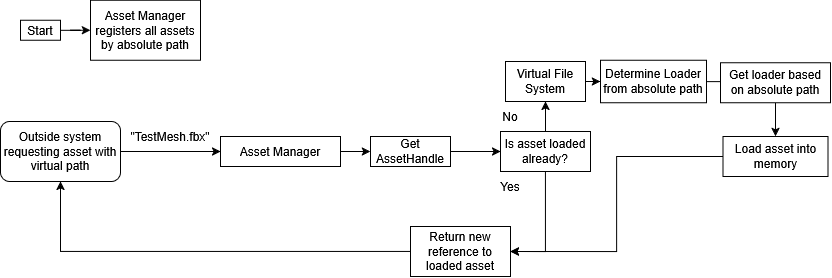
Asset Manager flowchart
When I was done with both the binary format and the asset manager I began to try loading the only reference scene I had access to in this fork of the engine. To a start I was expecting to not see anything which is exactly what happened to a start. This was because of a inconsistency in regards to the read and write binary stream objects which I solved pretty quickly. Once I could see something some parts of the scene was visible and other parts wasn’t.
Parts of the test level successfully replicated from binary
The problem originated from a inconsistency in how materials were serialized to the binary format. Thanks to the modularity the binary read/write interface allowed for, I quickly amended the problem and the level could be loaded correctly.
Test scene successfully replicated totally from binary
Since the project was made in a fork of the engine from the beginning of preproduction the load times for the scene were not noticeable so I decided to instead compare the load times specifically by when loading the player animated model asset 5000 times from both source and binary. I ran the test by iterating 5000 times, loading the asset in and out of memory while running a quick validation check to make sure it was correctly loaded into memory. I knew that the binary format would result in quicker loading times but I didn’t expect the drastic difference in time it took between the different formats. I compared times in debug and release configurations of the application with AMD Ryzen 7 9700X 3,8 GHz 40MB processor, 32GB DDR5 6000 MHz RAM and a SSD as equipment. In debug it took 8 minutes and 21 seconds to load from source format and 55 seconds from binary format which was a reduction of around 89% in load times. In release the loading took 2 minutes and 42 seconds from source and 32 seconds from binary which was an improvement of roughly 80,5% in load times.
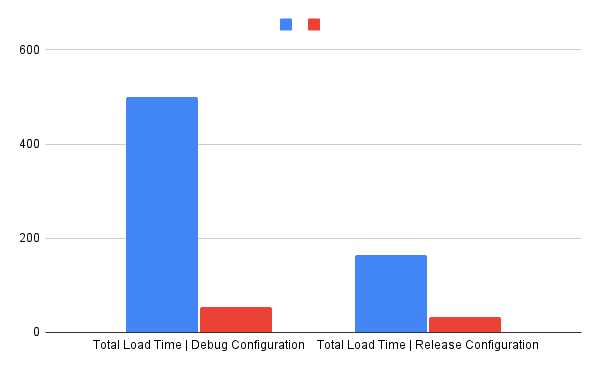
Total time to load the asset 5000 times in seconds
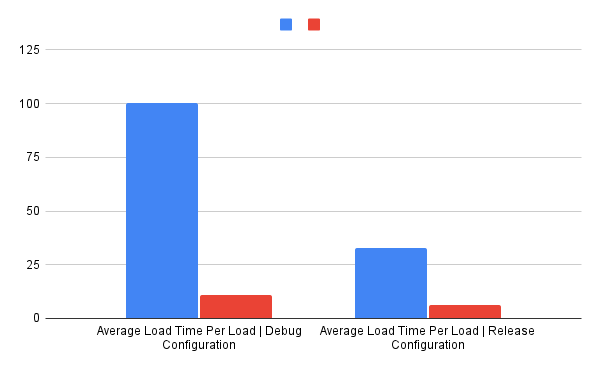
Average time to load the asset once in milliseconds
Process
Binary Read/Write Interface
Since the binary file format was such a fundamental piece of the system I decided to begin developing a interface for reading and writing. Recognizing the error-prone nature of manual binary serialization, I prioritized a modular design that could seamlessly handle arbitrary types through a dispatch pattern. I developed a system leveraging Argument-Dependent Lookup (ADL). This allowed for an extensible serialization pattern where support for new types can be defined externally, keeping the core engine code decoupled and maintainable.
Taking inspiration from my previous experiences I created two separate classes, one for reading and one for writing, which contained definitions of how supported template types like std::vector or std::unordered_map would be handled. Simple types, such as int or float could be directly written or read, and custom types specified behavior thorough a universal interface by defining a template specialization of the class BinaryTypeSerializeInteraface and two static functions, one for serializing and one for deserializing.
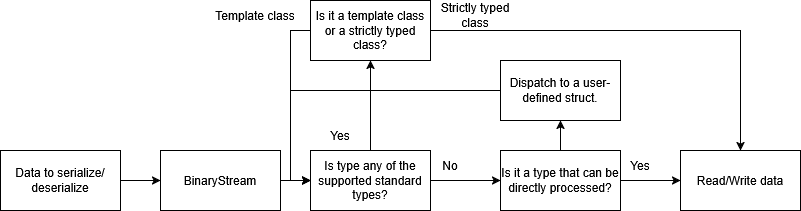
Binary read/write data flow
	template<>
	struct BinaryTypeSerializeInterface<CustomType>
	{
		static void Serialize(const CustomType&, BinarySerializeStream&)
		{
		  //Serialize contents from CustomType to file
		}

		static void Deserialize(CustomType&, BinaryDeserializeStream&)
		{
		  //Deserialize contents into CustomType object
		}
	};
Definition of read/write behavior for custom types
Although some might question the choice to separate the interface into two binary stream classes instead of one since you can both read and write from a single file stream in the standard library , I’d argue that the conceptual separation of reading and writing is worth the duplicate code to cover mutual functionality of the binary streams.
Binary File Format
I wanted to create a more sophisticated file format that would add a layer of security to avoid straight crashes or reading incorrect data. After consulting my supervisor I implemented the following parts to the file format: asset header, meta data, body and table of contents in that order.
All assets could be converted to a binary format through a separate process independent of the actual game. The binary files were constructed with the specified structure by first loading the asset from the source format and extracting only the information required to correctly reproduce the asset once read into memory.
Versioning of the file format was also taken into consideration in case the file format would be used in a larger project. In each asset header there was a version number which was used during load to determine how that specific asset file was loaded.
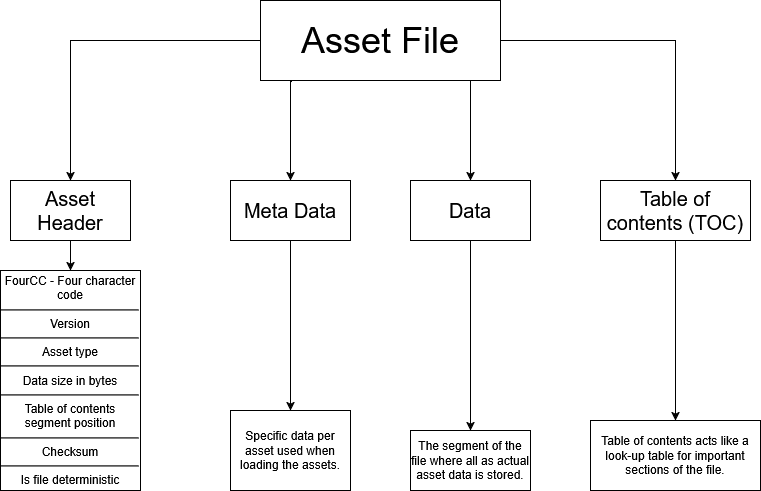
Binary asset file structure explained
Asset Manager flowchart
Asset pipeline
The asset pipeline before consisted of a registry which at startup registered all assets inside the asset folder of the engine. It also enforced partial ownership over a asset by returning a shared pointer to the resource directly based on a asset path. During the projects I did at TGA this design sufficed but on larger scales this would either mean that all the assets need to live somewhere in the architecture or the systems that want assets need to store a string in order to fetch the asset at a desired time.
I began by rewriting the way assets were registered to instead, at startup, map a set of paths, one relative to the asset folder, another for the asset name and extension and one for just the name, to a UUID, short for universally unique identifier, which were mapped to one unique asset. The UUID’s were either generated or read from a meta file depending on if the meta file for a certain asset existed or not.
When a system queries the asset manager for an asset either a new reference is returned or the asset is loaded depending on if the asset is in memory or not. If the asset is not loaded the input was treated as a virtual path which was processed by the virtual file system to find the absolute path. The absolute path was then used to find the most suitable loader to load and return the asset. In no suitable loader was found nullptr was returned.
Compared to the previous asset manager where the loading was handled in the assets themselves I wanted to separate the containment of the asset data from the deserialization of the asset data because if often often led to unrelated headers being included in the asset which further polluted systems relying on the assets. Decoupling the loading also allowed to more easily implement and maintain versioning of the binary assets.
Virtual File System (VFS)
Whenever the asset manager had to process a virtual asset path the VFS was responsible for getting the absolute asset path which could be loaded.
I chose to design the VFS to manage different sources which could be registered with priority. Upon creation of sources I made the sources able to filter files by extensions which allowed me to have one source dedicated to binary asset files and one for source asset files.
For the scope of this project I created a FolderSource class which consisted of a path in which the input virtual path was appended on to create an absolute path. When created the folder source iterated over all files in its given directory and registered all valid assets to create a directory cache making path validation faster.
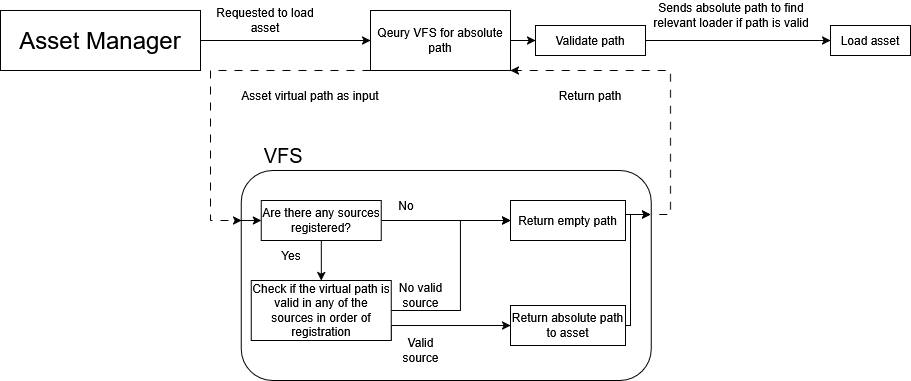
VFS flowchart
Future Considerations
In the coming future I’d like to try and integrate the parts of the asset manager that differ from the engine’s as well as the binary file format and read/write interface to see if the load times are decreased in more busy scenes. For the scope of this project meta files being included in all configurations are fine but it’s something that I’d like to remove for release configurations when implementing into the engine since they’re storing asset information in a readable way to more easily debug potential problems.
Another thing that I want to further experiment with in the future is solidifying and properly test the versioning system of the binary asset files with a fully defined pipeline to version them. Currently the pipeline to handle versioning is in place except for effectively changing the version of a file. Due to time constraints and it not being a main priority to fully test for this project I decided to not delve deeper into establishing a better versioning pipeline during this project.
If I get the time I’d love to research more about pack files and implement it in the engine during release configurations to lower operating system file operations from having a binary file per asset to just one file keeping track over all assets. Besides potentially gaining a bit of performance in load times from loading assets I think it could be a fun learning experience.